
Claude Code can't fix what it can't see
Test your iOS app or website by hand. Mark a bug with one key or your voice, and Claude Code gets it with the video, the steps and the logs.
No account. Nothing to install in your app or site.
Bugs that cost you an evening
You can't make the bug happen again
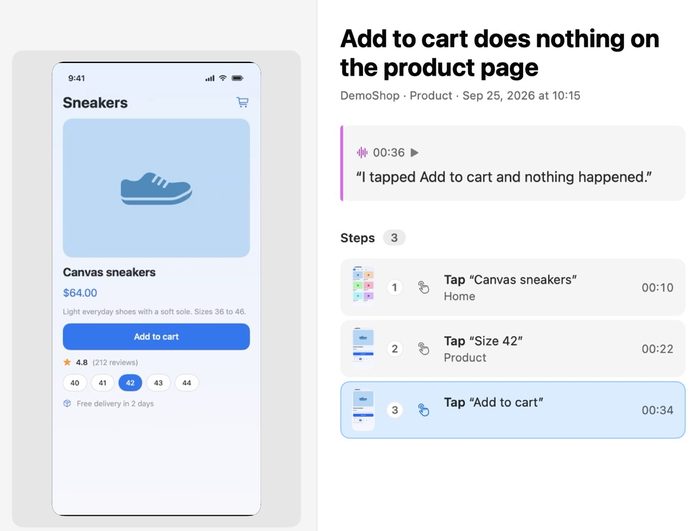
Your taps, screens and log lines are saved with the bug.
You can't explain what looks wrong
Claude Code gets the screen and your own words.
The AI says fixed, the bug remains
You check the fix and approve it.
What Claude Code gets with each bug
- Video of what you saw
- Each tap or click, in plain words
- Logs, console errors and failed requests
- Your own words, by voice or key
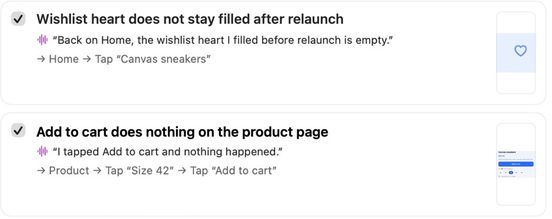
- Claude Code reads the bug, changes your code and tells LastBug what it did
Connect Claude Code once
1
Pick the tool
In LastBug open Settings, then AI, and choose Claude Code.
2
Copy one line
Copy the line LastBug shows. Paste it into Terminal and press Return.
3
Start a new chat in Claude Code
Ask it to take the next task from LastBug.
Your recordings stay on your Mac
- Claude Code reads only the tasks you hand to it.
- You use your own Claude Code plan.
Questions
Do I add code to my app?
No. LastBug records the Debug build you already run in the iOS Simulator. For a website, open its address.
Which Claude Code plan do I need?
Your own. LastBug has no AI of its own and no account. It hands the bug to the Claude Code you already use.
Can Claude Code see all my recordings?
No. It reads only the tasks you hand to it.
Other AI tools
Also see: LastBug for Codex, LastBug for Cursor, All AI tools.